


Need to send an account number or login id/password or some other sensitive information via email? HushMail.com makes it easy to send encrypted email. Free!
It will protect your mail from all types of Viruses, Trojan horse and all types of internet attacks. So use HushMail and be secure on web.
Source:TechZoomIn
Don't miss single article:Get it by E-mail
Showing posts with label Tech Tips. Show all posts
Showing posts with label Tech Tips. Show all posts
HushMail:A Secured & Encrypted Mail Service
·
How To:Take Screen Capture
·
You might know the importance of screen capture. One of the regular tasks we do as a Blogger is taking the photos of screens to explain our reader very clearly. Providing a relevant picture in your article catches the eye of readers. For taking this you don’t need to buy or download any special software. Just a couple keys in your keyboard will do this for you. Here is how to for different Operating Systems:
Windows System: If you are using Windows just hit your Print Screen key. This copies the screen and places it in your clipboard. Now open any image editor (Run->Mspaint) and click Edit - Paste. Save this new image in any format you want.
In order to capture only the active window (the window that has the focus), hit ALT + Print Screen.
You can use any image editor like Mspaint, Adobe PhotoShop, Paint Shop Pro, Fireworks.
Macintosh System: On a Mac hit Apple + Shift + 3.
Linux System:Linux systems usually come with a free screen capture utility. For example, you can find one under the KDE desktop.
Source:TechZoomIn
Don't miss single article:Get it by E-mail
Google enabled Adsense for Games
·
Google is still working towards providing Adsense for all the internet users and masters. After came with Adsense Feeds, now its turn for Game site masters and developers. Yes from now Adsense is available for Games sites also. They can keep Adsense ads (Video, Image, Text ads) with in the game. Even we can define the place or corner where the ads should display.
Source:TechZoomIn
Don't miss single article:Get it by E-mail
Take Backup of your Feeds
·
I came across this problem today. Unfortunately I lost all the feeds from IE7 and now I didn’t remember all those useful sites. So I thought its worth to share with all the blogging people to avoid them to face the same issue.
Make sure to take Backup once in month at least. Here is the process how
- Click on the Add button (the star and plus button next to the Favorites Center button — Alt-Z is the keyboard shortcut).
- Click on Import and Export in the menu.
- In the wizard, select Export Feeds from the list of options and click next.
- Select where you’d like the file to be put (by default, it’s called feeds.opml, in your Documents folder)
- Finish up the wizard.
Enjoy Blogging!
Source:TechZoomInDon't miss single article:Get it by E-mail
The 25 Most Influential People on the Web
·
Each year Business Week will conduct a campaign to reveal the list of most influential people on the web. So time comes to 2008 and here is the list of 25 people for this year.
Few words from BW Tech Team:
Each year, we turn to readers and Business Week staff for the Best of the Web list, asking them to contribute names for a list of the Internet’s movers and shakers. Take a look at the slide show to see which people have the most impact on the Web these days.
Add Photos by Email in Picasa Web Albums
·
There's an easy way to upload photos to Picasa Web Albums if you don't want to install Picasa: send your photos by email to a secret address.
First you need visit the Settings page and check "Allow me to upload photos by email." The secret email address where you can send your photos has the following format: username.secretkey@picasaweb.com, where secretkey needs to be defined in the settings.
By default, Picasa Web uploads your photos to the built-in Drop Box albums, but it's a good idea to choose your destination by entering the name of an existing album in the subject of your email.
Add Photos by Email in Picasa Web Albums Posted: 03 Sep 2008 05:01 PM PDTThere's an easy way to upload photos to Picasa Web Albums if you don't want to install Picasa: send your photos by email to a secret address.
First you need visit the Settings page and check "Allow me to upload photos by email." The secret email address where you can send your photos has the following format: username.secretkey@picasaweb.com, where secretkey needs to be defined in the settings.
By default, Picasa Web uploads your photos to the built-in Drop Box albums, but it's a good idea to choose your destination by entering the name of an existing album in the subject of your email.
First you need visit the Settings page and check "Allow me to upload photos by email." The secret email address where you can send your photos has the following format: username.secretkey@picasaweb.com, where secretkey needs to be defined in the settings.
By default, Picasa Web uploads your photos to the built-in Drop Box albums, but it's a good idea to choose your destination by entering the name of an existing album in the subject of your email.
Make sure you don't share the secret email address with other people, like I did in the screenshot above. And if you do, just choose a different secret key for your address.
You can attach up to 20MB of photos in JPG, GIF and PNG formats, which is a pretty reasonable limitation. Since Picasa Web's mobile site still doesn't support uploading photos, the new option should be really useful when you want to share photos from a phone with email or MMS capabilities.
Sponsored By
Don't miss any article:Get it by E-mail
Don't miss any article:Get it by E-mail
Google Turns On AdSense For Feeds
·
After more than two months of testing, Google has finally turned on AdSense for Feeds. Formerly, these were FeedBurner ads. The acquired company has moved its advertising program over to Google’s system, and now any AdSense advertiser can tap into the Feedburner network.
The ads are contextual and come in different sizes and formats. Google Operating System, which noticed that the service is now turned on, reports:
"The new AdSense for Feeds option lets you create a new ad unit that has a format automatically selected from 468×60 and 300×250. . . . You can choose if you want image ads, the ad frequency, the position (top or bottom of the post), the colors and a channel that tracks the ad performance."
Hopefully, this will turbocharge ads in feeds, which have not been a stellar performer so far. Does anybody click on those ads? Maybe they should be seen more as branding opportunity, because you certainly see them when you are scrolling through your blog and news feeds.

Windows Live Messenger 9.0 M1 screenshots and details leak
·
The first Windows Live Messenger 9.0 beta program closed on June 24, 2008, and testers were not given much information about what Microsoft was planning to put into version 9.0 (the first beta build showed few changes). August, however, is making things more interesting again.
Hot on the heels of the news that Windows Live Messenger 9.0 would getting a new GUI, and one that would include Windows Presentation Foundation (WPF) features, come leaked screenshots and details of the Milestone 1 (M1) build. Mess.be managed to grab the build from Microsoft's internal testing program, which recently just happened to have internally released the M2 build. While the M1 build is already old, the screenshots do show a lot of changes:

Read further on arstechnica
Don't miss any article:Get it by E-mail
 and testers were not given much information about what Microsoft was planning to put into version 9.0 (the first beta build showed few changes). August, however, is making things more interesting again.
Hot on the heels of the news that Windows Live Messenger 9.0 would getting a new GUI, and one that would include Windows Presentation Foundation (WPF) features, come leaked screenshots and details of the Milestone 1 (M1) build. Mess.be managed to grab the build from Microsoft's internal testing program, which recently just happened to have internally released the M2 build. While the M1 build is already old, the screenshots do show a lot of changes:
Notice that even the about dialog is styled with the new GUI. Windows Live Messenger 9.0, which is expected to arrive with the Windows Live Wave 3 (the new header gives it away) rollout, will not only be sporting a new GUI, but will have many new features as well. The first most prominent one is the Favorites category, located at the top of the contact list. Contacts added to it have more details about them shown and are easier to find on the list. I can already see the arguments over who is in who's Favorites category 13-year-olds will be having.
Read further on arstechnica
Don't miss any article:Get it by E-mail
Blogging Is Not A Crime
·

I found this arresting chart on Swivel. It plots the number of bloggers who have been incarcerated over the past few years, based on data collected by the World Information Access project. The number of incidents it tracks went from five arrests in 2003 to 35 last year. As blogging expands internationally, so do the risk of speaking one’s mind. (Something many of us take for granted).
Most of those arrests are in countries with oppressive regimes, such as Egypt, China, Saudi Arabia, and Iran. But bloggers have been arrested in Canada, France, Greece, and even the U.S. (with Josh Wolf being one of the most famous incidents—he spent the better part of a year in jail for refusing to turn over journalistic video footage to a grand jury).
A few involve cases of alleged terrorism or pedophilia, but the majority involve some form of political speech. Some typical examples:
- Reza Valizadeh (Iran; November, 2007). “For revealing Iranian president’s overpriced dogs that his security team uses.”
- Charles Leblanc (Canada; June, 2006): “For taking pictures at a conference for his blog.”
- Josh Wolf (USA; August, 2006): “For videotaping a burning police car.”
- Hu Jia (China; December, 2007): “For posting his vocal critiques of human rights abuses and environmental degradation in China and calling the Olympics a ‘human rights disaster.’”
- Reza Valizadeh (Iran; November, 2007): “For revealing Iranian president’s overpriced dogs that his security team uses.”
- Nay Phone Latt (Burma; January, 2008): “For posting pictures of monks and people demonstrating on the streets.”
I’ve uploaded a spreadsheet with the names of all 64 arrested bloggers tracked by the WIA that includes their country, date of arrest, and reason for arrest. These do not include people arrested for impersonating someone else on Facebook or unfortunate enough to be beaten to death during an arrest.
Install multiple versions of IE on your computer for testing
·
Are you a web designer looking for a way to test your web site in different versions of IE? Firefox and Safari are easy to test in because they can all be installed on the same computer at the same time, however, IE only allows one version of itself to be running at any one time. This is can be very annoying for web developers because they either have to have multiple boxes or test using online services.
Earlier I had written about a cool web site called BrowserShots, which basically lets you view what your webpage will look like in about 20 different combinations of browsers and versions. It’s a great tool, but there are many times when you want to interact with a site on each browser in case you’re using Javascript, flash, or other types of code.
Luckily, there is a freeware application from TredoSoft that makes it possible to run different versions of IE, all the way from 3.0 to 7.0 at the same time! Now that is cool! Basically, it uses some sort of hack found in 2003 that uses DLL redirection.
Once you download it, you’ll get the option to select which versions of IE you want to install, including IE3, IE 4.01, IE5, IE5.5, and IE6.
Unfortunately, the installer will only work on Windows XP, it’s not meant for Windows 2000. Anyway, after it is installed, you’ll see the shortcuts conveniently created in your Quick Launch bar. So what about IE 7 you may be asking? Well there is a way to install IE7 in what is called “standalone” mode, which means it won’t interfere with the other versions on IE already installed. You can on how to do that here. This way, you can test your web site in IE 3 to IE 7. These guys seem to be pretty active, so hopefully they will be able to get IE8 to work as well once it’s out of beta.
And that’s it. You should now be able to open all the different versions of IE up at the same time on the same computer!
 Overall, it’s a great program slapped together by some guys who saw a need that had not been filled. It may not work perfectly all the time (IE might crash somtimes), but it’s definitely worth throwing on a test box if you’re a full time web designer, blog designer, Javascript programmer, etc. Enjoy!
Don't miss any article:Get it by E-mail
Repair and view corrupted or damaged images
·
Sometimes when you recover a deleted picture, you’ll find that, even though it’s been 100% recovered, it has been damaged or corrupted, so you can’t view it. This can be very annoying, and it’s happened to me before. When it happens, the corrupted pictures taunt you, with their blank background, and only a few small words that read: ‘No Preview Avaliable’.
Please note that repairing a corrupted or damaged image is completely different from recovering a deleted image.
Files can become corrupted if they happen to be stored on a hard drive that has bad sectors. Even if you run ScanDisk to fix the bad sectors, the image may still be corrupted and not viewable.
After vigorously browsing the Internet, I only found a few random methods on how to repair corrupted pictures.
The one program I found that worked was PixRecovery. It’s a data recovery program for corrupted or damaged files, which was exactly what I needed. It supports multiple file type, including all the big one’s like .JPEG and .GIF.
Using it was a breeze. Simply run the program, pick the file you wish to recover, and click ‘Recover‘. Done. In under 60 seconds, you should have a recovered file, which is a lot quicker than some of the other methods that popped up on Google. And there it is! Your file all nice and repaired.
The program also has a very clean and neat GUI interface without any bell and whistle useless features. It simply recovers files and that’s it.
The only thing I dislike about this program is the INSANE pricing of the program - It’s $149! And that’s just for a single user license. I think it’s because they’re the one of the few guys out there who have a program to repair corrupted image files which actually works.
So instead, I just used the Demo to recover as much as I could with it’s limited capabilities. To get the demo, simply go here:
http://www.officerecovery.com/downloads.htm The program works fine in demo mode, but puts a watermark onto the image. It’s really handy, especially by getting all those memories again. But, the pricing is just too high for me to even consider buying the program. If you can live with the watermark, then use the demo or if your pictures are that important and a free program is not working, the $150 might be worth it.
Sponsored By online-tech-tips
Don't miss any article:Get it by E-mail
Snowl: Unified Messaging In Your (Firefox) Browser
·
Mozilla Labs announced a new project today called Snowl. It is an add-on for Firefox that aims to bring all of your messages together in one place, whether it is from email, SMS, Tw itter, or RSS/Atom feeds. The project right now is an early, buggy prototype that only supports RSS/Atom feeds and Twitter. So that is nothing special.
But once email and SMS is folded into the mix, it could become a very powerful messaging center, built right into the browser. It will allow you to search through all of your messages and feeds, both public and private, no matter where they originate.
The current version of Snowl shows messages in one of two ways: in a three-paned window much like a traditional e-mail client, and in a river-of-news view. This is a separate project from Mozilla’s Thunderbird e-mail client, although it does overlap somewhat. The point of Snowl is specifically to “help you follow and participate in online discussions.”
You can download Snowl here (for those brave enough to try it—Mozilla warns that it is ” primitive implementation with many bugs, and subsequent versions will include changes that break functionality and delete all your messages, making you start over from scratch.”)


Don't miss any article:Get it by E-mail
When Google Owns You---Must read
·
 Nick Saber isn’t happy now. Monday afternoon, after lunch, Nick came back from lunch to find out that he couldn’t get into his Gmail account. Further, he couldn’t get into anything that Google made (beside search) where his account credentials once worked. When attempting to log in, Nick got a single line message:
Sorry, your account has been disabled. [?]
That’s it.
Nick sent a message or three to Google for support. He got back this:
Nick sent a message or three to Google for support. He got back this:
"Thank you for your report. We’ve completed our investigation. Because ourinvestigation was inconclusive, we are unable to return your account atthis time. At Google we take the privacy and security of our users veryseriously. For this reason, we’re unable to reveal any further informationabout this account."
And that’s it.
Suddenly, Nick can’t access his Gmail account, can’t open Google Talk (our office IM app), can’t open Picasa where his family pictures are, can’t use his Google Docs, and oh by the way, he paid for additional storage. So, this is a paying customer with no access to the Google empire.
If he was doing something wrong/illegal/invalid, they might’ve said so (not thinking that he was). If he had been hacked, wouldn’t that be something vaguely apparent? I dunno, but it seems like that’d be the way.
If he was doing something wrong/illegal/invalid, they might’ve said so (not thinking that he was). If he had been hacked, wouldn’t that be something vaguely apparent? I dunno, but it seems like that’d be the way.
So, what happens now? What does Nick do? He’s sent a bunch of emails. But now what? Locked out of ALL of Google’s apps, the apps that I praise daily, the apps where Julien Smith and I are writing a book. Should we be doing that? I didn’t see a problem until this. What if we’re the next Nick?
What’s your take? And what do you think of hands off customer service in this case?
Comment your feeling here.
**UPDATE: Nick got back in after quite a lot of work.


Will Windows work continuously for more than 49.7 days?
·
 Got this info from MS while browsing..........Good for knowledge base.....
Will Windows work continuously for more than 49.7 days? Here is a bit of information, which may surprise you all. Windows crashes automatically if you don't switch off the machine for 49.7 Days.
Microsoft accepts this. Do you know why?
In Windows the Virtual Machine Manager (here after referred as VMM) is responsible for creation, execution, monitoring and termination of virtual machines. This VMM, which is a 32 bit, protected mode operating system entity, provides a number of system services at chip level. One of these services is "Get_System_Time". This particular service loads the EAX register with the time in milliseconds since Windows started on that machine. This service is accurate to 1 ms. EAX is a 32 bit register in Intel 386 Processor onwards. So the maximum number of milliseconds it can hold is (232)-1 = 4294967295 milliseconds = 4294967.295 seconds = 71582.79 minutes = 1193 hours = 49.7 days.
So after 49.7 days the EAX resets to zero. Most of the Drivers use this Time Service to keep track of the Timeout of various services they provide. So after 49.7 days the drivers cannot use the Get_System_Time function of VMM and they crash taking the OS along with. Please check this knowledge base article 216641:http://support.microsoft.com/kb/216641/EN-US/
Make money from Blog or Site
·
My effort toword guiding new bloggers or site owners for earning money with the fun they r getting through blogging is ready now.
Find here : www.money-fromblog.blogspot.com
Will contain soon with the content of how to earn....
Watch for more here.
How to Run Multiple Yahoo! Messengers and Login to Multi Y!M Accounts
·
For Yahoo! Messenger with Voice 8 users, it’s now possible to run multiple instances of Yahoo! Messengers (polygamy feature)  and log into multiple Y!Msgr accounts with just a simple registry hack. So if you need to open and log-in multiple Yahoo! Messenger accounts as you have a few Yahoo! ID or various other reason, just use the small registry registration file below that once click, will modify and merge the registry setting required to run and execute multiple Yahoo! Messengers at the same time on a computer.Download ym8multi.zip, extract it and run “ym8multi.reg” contained inside the archive. Once the registry is patched, you can now starting and running multi Yahoo! Messenger with different login or Yahoo! ID accounts. If you want to uninstall the patch/hack, download the ym8multi_uninst.zip uninstaller which contains ym8multi_uninst.reg. Once double click on this uninstaller registration registry value file, it will edit the registry value and set it to disable the ability for Y!M 8 to launch multiple copy of instances.
If you prefer to edit and change the registry setting yourself manually, without using the above registry registration file, simply launch the registry editor (type regedit at Run command), and navigate to the following registry branch:
HKEY_CURRENT_USER\Software\yahoo\pager\Test
Then, on the right pane, right click on the registry editor and select “New”, then create a new DWORD registry value. Name the new registry key as Plural, and assign it the value of 1 (decimal). If some case, the value of 2 should also works. To disable or disallow multiple instance of Yahoo Messengers, simply change and set the “Plural” registry key’s value to 0, or delete the “Plural” key.
$1mn/4 Crores in INR paid to add just one letter to domain name
·
This summary is not available. Please click here to view the post.
How to add a video to my blog?
·

From Youtube:
In the upper right hand of the page, next to the video is a box with a link and an embed code.
To embed this video right onto your blog copy the code (Ctrl+C) in this embed box.
From Google Video:

On the right side of the video is a link that says "Email - Blog - Post to MySpace". Click on this link.
When you click that link some more links show up. Click on the one that says "Embed HTML".
If you want to embed this video right onto your blog, copy the code (Ctrl+C) in the embed box.
Into your Blogger Dashboard:
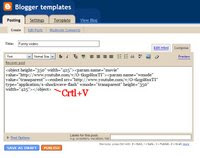
Paste the code (Ctrl+V) you saved earlier right into the text area.
Run Internet Explorer From Command Prompt - Windows Tips
·
Here's a simple way you can run Internet Explorer from the command line... Create a new text file that contains the following line:
CODE
@start "" /b "C:\Program Files\Internet Explorer\iexplore.exe" %*
Rename the file e.batCopy this file to your profile folder
QUOTE
C:\Documents and Settings\your_account_name
Now you can open a command prompt window and type the following
CODE
e www.funandtechpark.co.cc .
Subscribe to:
Posts (Atom)